Global and Korean services merge into one, the skill core leaves gear for a free slot, and Character Boost starts working on characters you already play.
Nov 11, 202642 min read307 changesKorean Server (KR) · tl.plaync.com
Quick summary — 8 key points
Tap each seal
One service, one clock
Maintenance every Wednesday at 05:30 UTC, reset at 06:00 UTC for everyone
Impact · Critical
Core becomes a free slot
Registers to the character, swaps at no cost, saves ready-made sets
Impact · Critical
Boost on an existing character
Level 60, ~9,000 combat power, 86.5M Solant, no new character needed
Impact · Critical
60 cores become weapons
Every Arch Boss core is collected and returned as its source weapon
Impact · High
30 new cores
Three armor and accessory colors for each of the ten weapons
Impact · High
Accuracy stops being dead weight
Longbow and Orb now convert Accuracy into shield, damage, and hit rate
Impact · High
Three queues at once
Unified matchmaking with automatic switch to the chosen loadout
Impact · High
Voice chat enters the client
Party, guild, and faction channels on PC — console is left out for now
Impact · Medium
CHAPTER 01
Unified service: one clock for both worlds
System
The global integration reaches the boring, decisive part: operating policy. Everything NC and Amazon Games used to run on different schedules now happens at the same instant, for everyone.
If you played on the Korean service, three things really change: maintenance day, the character slot cap, and server transfer — which now crosses regions.
Regular server maintenance
Common to both services
⚙ Unified schedule
Before
NC service: every Tuesday, 01:00 UTC · Amazon Games: every Thursday, 06:30 UTC
After
Unified: every Wednesday, 05:30 UTC
Content reset
Common to both services
⚙ Unified day and time
Before
NC service: every Tuesday, 02:00 UTC · Amazon Games: every Thursday, 08:00 UTC
After
Unified: every Wednesday, 06:00 UTC
Server transfer
Former NC service
▲ Cross-region transfer
The function is suspended for a few days after the update. Once it's back, it becomes permanent, with a 720-hour (30-day) cooldown per transfer. From now on it's possible to transfer between service regions.
Character creation
Former NC service
▲ 4 → 6 slots
The character slot cap per account rises to 6.
!
The notes were corrected a day before release
⟡ Heads up
The official text received a correction on November 9, at 16:13, exactly in the server transfer section for the former NC service. It's the most volatile item in the notes — check the final version on maintenance day before you plan a server move.
CHAPTER 02
First launch resets four options and opens eight languages
System
The first time you open the game after the update, an initial setup screen with the terms of service shows up. It's not decorative: four options get reset at that moment.
Initial setup on first launch
Common to both services
⚙ 4 options reset
Back to default: language, control mode, audio, and graphics quality. Language picks up whatever the launcher or OS is set to. Graphics quality discards your manual tuning and applies the recommended preset. You can redo all of it still on the setup screen or later, in options.
Privacy tab
Options · common to both services
▼ Removed
The Privacy tab was removed from options.
Voice guide on game entry
Options · former NC service
▲ New option
A new voice guide on game entry function was added, off by default.
Display languages
Former NC service
▲ 8 languages
Korean, English, Japanese, Traditional Chinese, French, German, Spanish, and Brazilian Portuguese.
Voice-over languages
Former NC service
▲ 3 languages
Voice acting in Korean, English, and Japanese.
CHAPTER 03
Temporary name locks nine areas of the game until you rename
System
The service merge produced duplicate names, and whoever lost the tiebreak got stuck with a temporary name. It's not cosmetic — until the name is fixed, nine systems that rely on finding a character by name stop working.
The name change coupon arrives by mail. Use it in the character window and everything goes back to normal.
How to unlock it
Character with a temporary name
⚙ Coupon by mail
Before
Nine areas of the game with blocked functions
After
Receive the name change coupon by mail and rename in the character window — every function comes back
Chat: setting a recipient and sending a whisper, blocking and unblocking a conversation.
Party chat: invite, search character, confirm invite, delegate leadership, change permissions, kick, apply and remove mute.
Mail: sending a message — the recipient field won't accept typing.
Relationships: friend request, add to interest and to alert, block.
Guild: invite to the guild.
Housing: add to the allowed visitors list.
Arena: invite an opponent to a duel.
Simulated Battlefield: invite to spectator mode, kick, accept invite, and join via invite link.
Character: look up the profile card by name.
CHAPTER 04
Character Boost now works on a character you already play
System
This is the change most people will use. Character Boost no longer requires a new character: you apply it on one already in your list, and it jumps straight to level 60 with gear and a combat loadout built for the chosen weapon pair.
A coupon you'd already saved also follows the new spec now.
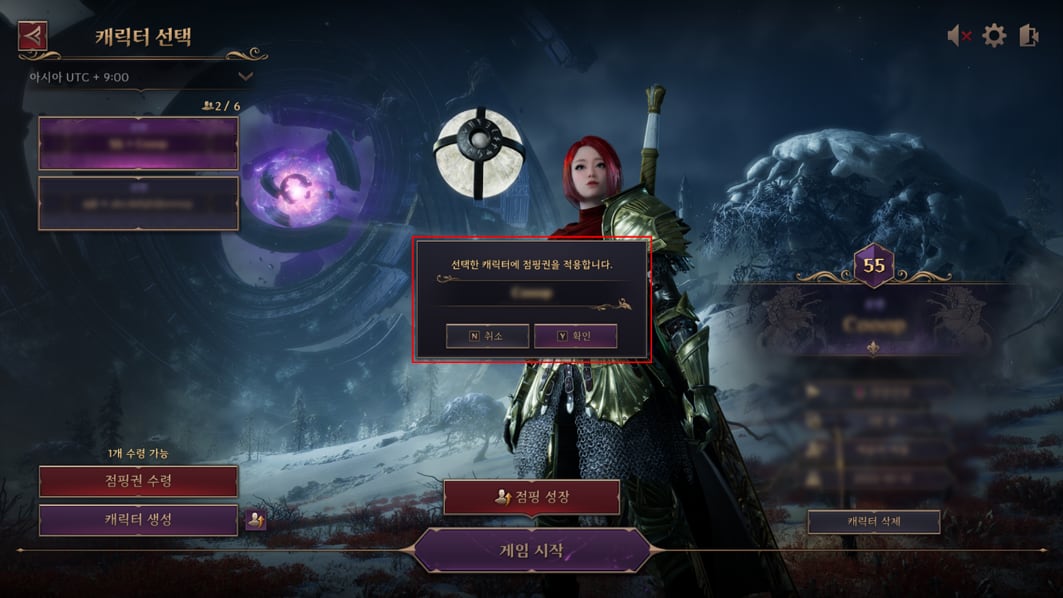
Step 1 — the game asks you to confirm the character before applying the Boost
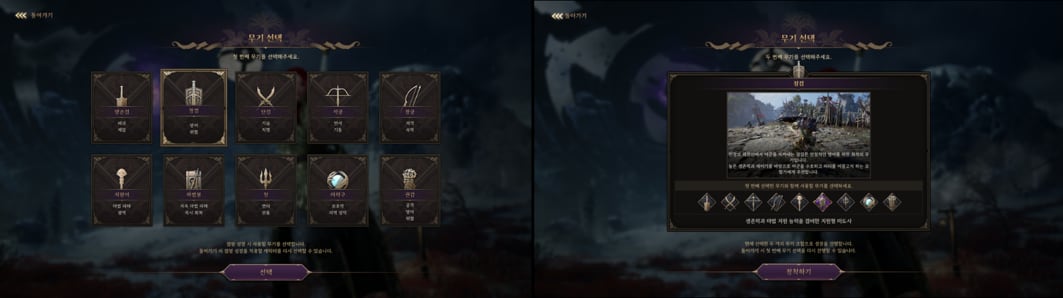
Step 2 — the grid of ten weapons; each pick carries a different build profile
Character Boost coupon target
Usage condition
▲ Existing character
Before
Only a freshly created character
After
Any character between level 2 and 59
Adventure Codex progress
Usage condition
⚙ Progress cap
The character cannot have completed the segment Part 3, Act 1. The Forbidden Book of the Cult > Welcome Companion > Conversation with Beni. Past that, the coupon no longer works on it.
Repeated use
Starting November 11, 2026
▼ Once per character
A character that uses a Character Boost coupon after November 11, 2026can't use another one.
Step by step
Three steps on the character selection screen
⚙ New flow
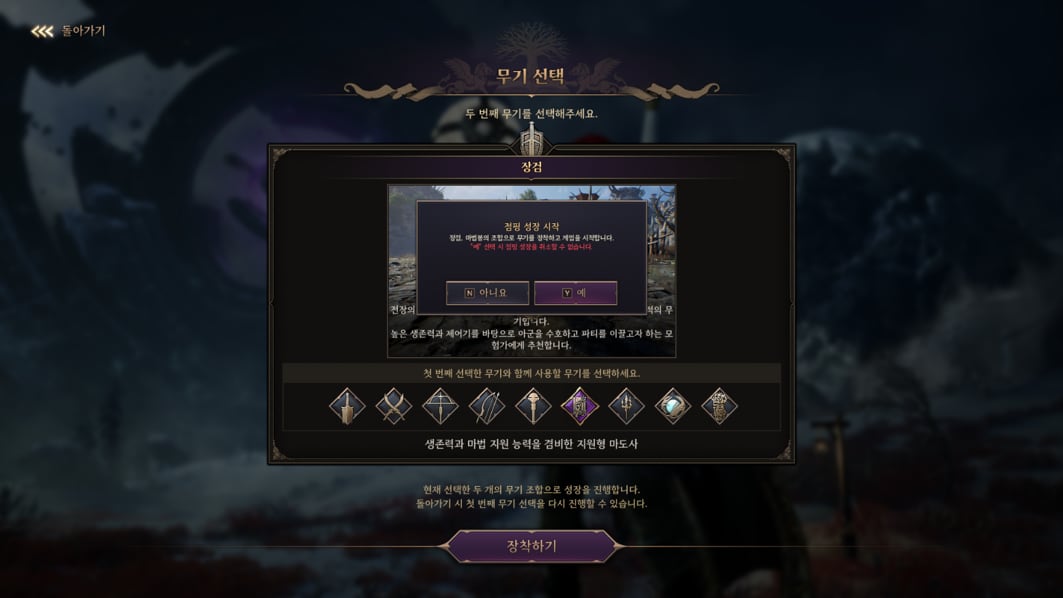
(1) Pick the character in the character selection menu, open Character Boost, and confirm it's the right one. (2) Pick the weapon combination — it defines the entire build. (3) Once the weapon pair is confirmed, the Boost is applied.
Step 3 — the second weapon closes the combination and the Boost begins
CHAPTER 05
What happens to what you already had on the character
System
Here's the risk of applying the Boost on an old character. Nothing is deleted, but everything gets shuffled off-stage: gear, common bag, artifacts, and presets all get reorganized to make room for the Boost's configuration.
Equipped gear and common bag
Handling of previous holdings
⚙ Everything to the warehouse
Everything equipped or in the common bag is moved to the warehouse — even if it overflows the storage cap. Until you trim the warehouse back to the limit, no new item can be stored.
Equipped artifacts
Handling of previous holdings
⚙ To the artifact bag
They're unequipped and stored in the artifact bag, also overflowing the limit if needed. Same rule: storage resumes only after you organize it.
Gear presets
Handling of previous holdings
▼ Full reset
Before
Your assembled gear presets
After
All reset, and preset 1 now holds the Character Boost's gear
Weapon specialization preset
Handling of previous holdings
▼ Preset 1 overwritten
Before
Your weapon specialization preset 1
After
Overwritten by the Boost's configuration for the chosen weapons
Resources, points, and package tokens
Handling of previous holdings
▲ Added to what you have
Everything the Boost delivers is added to what the character already owned. The only exception is the Regional Contribution Certificate, which is only applied up to the cap.
Codex, achievements, journal, and World Tree
Handling of previous holdings
▲ Marked as complete
Incomplete entries within the Boost's scope are marked complete. Whatever was already complete stays complete, and progress outside the Boost's scope is preserved.
!
Onboarding starts at the Hill of Reunion
⟡ Heads up
After the Boost, the character enters the game already set up with the recommended loadout, in the dedicated area Hill of Reunion (해후의 언덕). Only after that tutorial do you travel to the continent of Solisium. Applies equally to new and existing characters.
CHAPTER 06
The level 60 package was redone — and it's generous
System
Character Boost's recommended loadout was overhauled in this update. The character comes out ready for content, not just leveled on paper.
Level and combat power
Character configuration
▲ Level 60
Base gear with the two chosen weapons, armor, accessories, and artifacts — around 9,000 combat power.
Specialization and skills
Character configuration
▲ 200 specialization
Specialization for the chosen weapons at level 200 each, plus skill specialization, skill set, traits, and runes already assembled.
Attack, defense, and support runes
Character configuration
▲ 100 / 10
Weapon and accessory runes at level 100 each; armor runes at level 10 each.
Gear extras
Character configuration
▲ PvP kit + fishing rod
A starter PvP gear set and the fishing rod you'd normally only get through progression.
Fast travel
Character configuration
▲ Everything up to Toland
Every teleport stone for field and dungeon up to Toland already unlocked.
Cosmetic and subscription
Character configuration
▲ 28 days
The Tempered Warrior outfit and emote, the Sit on the Throne pose, and the Solisium's Blessing subscription for 28 days.
Adventure Codex
Content progress
▲ Through Part 3 Prologue
Completed, with rewards claimed, through Part 3, Act 1. Prologue.
Growth Journal
Content progress
▲ Through level 60
Completed, with rewards claimed, through level 60.
World Tree's Guide (세계수의 인도)
Content progress
▲ Root stage 5 · Leaf stage 1
The Root's Beginning completed through stage 5 and The Leaf's Fruit through stage 1, with rewards claimed.
Exclusive progression items
Content progress
▲ Delivered
Transformations, guardians, amitoi, titles, and star memories that only drop from this content are delivered. Achievements that can only be earned through them are marked complete.
Platform achievements and trophies
Content progress
▼ Don't count
Per platform policy, console and store achievements/trophies aren't granted automatically — unlocking them still requires creating a separate character and playing.
Contract Seal: Abyss — 20,000
Contract Seal: Dimension I — 2,700
Contract Seal: Dimension II — 5,400
Solant — 86,500,000
Resistance Extra Supply Coupon — 10
Mystic Key — 1
Regional Contribution Certificate — 3 (applied only up to the cap)
Commission Coin — 1,100
Weapon Specialization Change Scroll — 5
Skill Change Scroll — 24
Precious Ore Selection Box — 100
Chaos Soul Stone: Kalancia — 45
Adventure Coin: Endurance — 26
Special Class Resistance Medal — 21
Various consumables — World Tree Leaf, Stella Bloom, mana regeneration potion, spirit recovery stone, and similar
CHAPTER 07
One free Boost coupon per account, new or old
System
NC isn't selling the renewed Boost — it's giving it away. One per account, no redemption red tape.
Coupon distribution
New and existing accounts
▲ 1 per account
One Character Boost coupon per account, one-time only. There's no redemption process: after the update it's already available in the lobby. Accounts created after the update also receive the coupon on first login.
Usage window
Free coupon
⚙ Until further notice
The distributed coupon is valid until further notice — NC states it may change availability or revoke the coupon in a future announcement. A coupon bought with real money is not affected by that revocation.
CHAPTER 08
The skill core leaves gear and becomes a slot
System
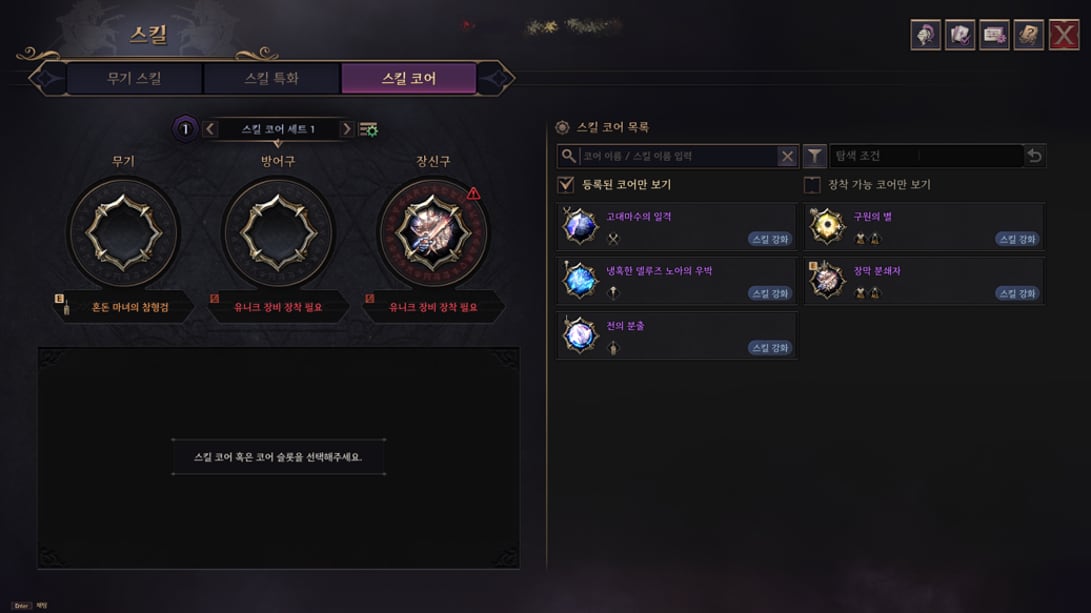
The most important design fix of the year lands today. The skill core stops being engraved on the item and becomes registered to the character, occupying three dedicated slots: weapon, armor, and accessory.
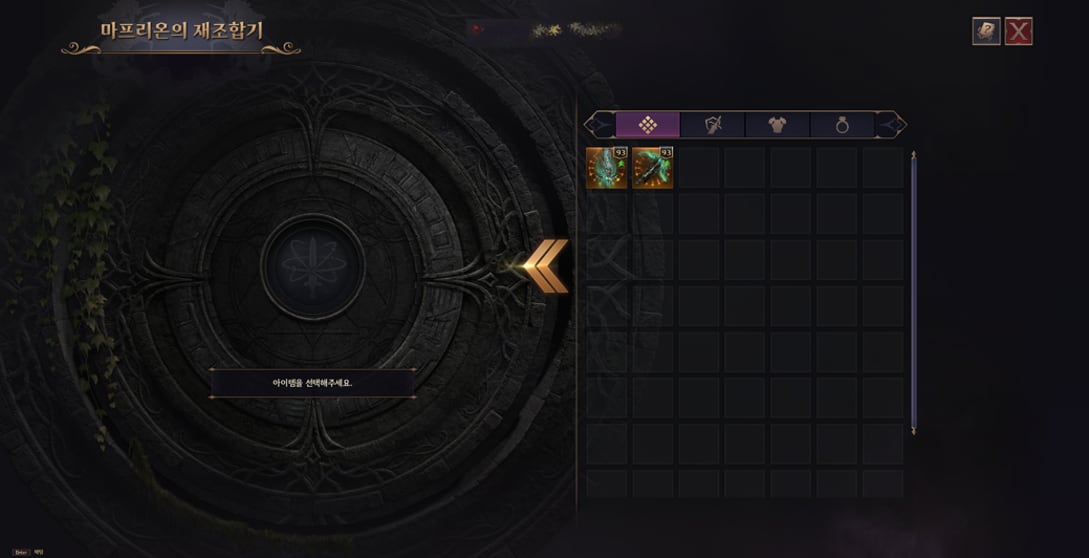
Engraving and extraction used to cost something. Now there's no cost and no limit on how many times — which changes build experimentation from "too expensive" to "free."
The new Skill Core tab, with its three slots — weapon, armor, and accessory — and the list of registered cores on the right
Maprion's Recombinator without the engraving and extraction tabs: only attribute conversion is left
Where the core lives
[Skill Core] tab in the skills screen
▲ Dedicated slot
Before
Engraved directly onto gear, with a cost per engraving and per extraction
After
Registered to the character and slotted into a dedicated slot, at zero cost
The core item becomes a consumable
Registration
⚙ Automatic use
The core becomes a use item: using it adds it to the character's core list. On obtaining it, it's used automatically — except for tradeable cores, which require manual use. Once registered, the item is consumed: it no longer exists as an item and can't be traded.
Swap, equip, and remove
Registered cores
▲ Free and unlimited
Before
Engraving and extraction had a cost and friction
After
No cost and no limit on equipping, swapping, or removing
What turns the effect on
Activation rule
⚙ Slot + unique item
The core is defined by the equipment slot, not by the item. The effect only runs with a unique piece equipped in the matching slot, and with the core's type matching the weapon's type.
Swapping gear
Activation rule
▲ Configuration preserved
Swapping gear doesn't erase the core configuration. You can even set up a configuration with no gear equipped at all — the effect simply stays off until the requirement is met.
Same core in different slots
Activation rule
▼ No stacking
Equipping the same core in multiple slots doesn't stack the effect.
Skill Core Sets
New function
▲ Core presets
You can now save core configurations and switch between them on the fly.
Core icon
Interface
▲ Compatible weapons shown
The icon now shows which weapons can use that core.
Maprion's Recombinator
Engraving and extraction
▼ Function removed
Before
Engraved and extracted skill cores, and converted attributes
After
Engraving and extraction removed — attribute conversion keeps working as before
Dissolving gear with a skill
Except Arch Boss weapons
▲ Returns the core
Dissolving gear that has a skill now also delivers the weapon's core. The dissolution cost stays the same.
CHAPTER 09
Return, merge, and the end of the scrolls
System
With the old system shut down, everything that lived inside it needs a way out. Engraved cores come back by mail, duplicated cores merge into one, and the two scrolls that fueled the cycle are collected with compensation.
Cores engraved on unique gear
Conversion
⚙ Returned by mail
Before
Engraved on the unique piece, locked to the item
After
Unlinked from the gear and sent by mail — use it to register and slot it in
Every skill core crafting recipe was removed, with the sole exception of the Resin Flower (레진 플라워).
CHAPTER 10
Arch Boss weapon now delivers the core with it
System
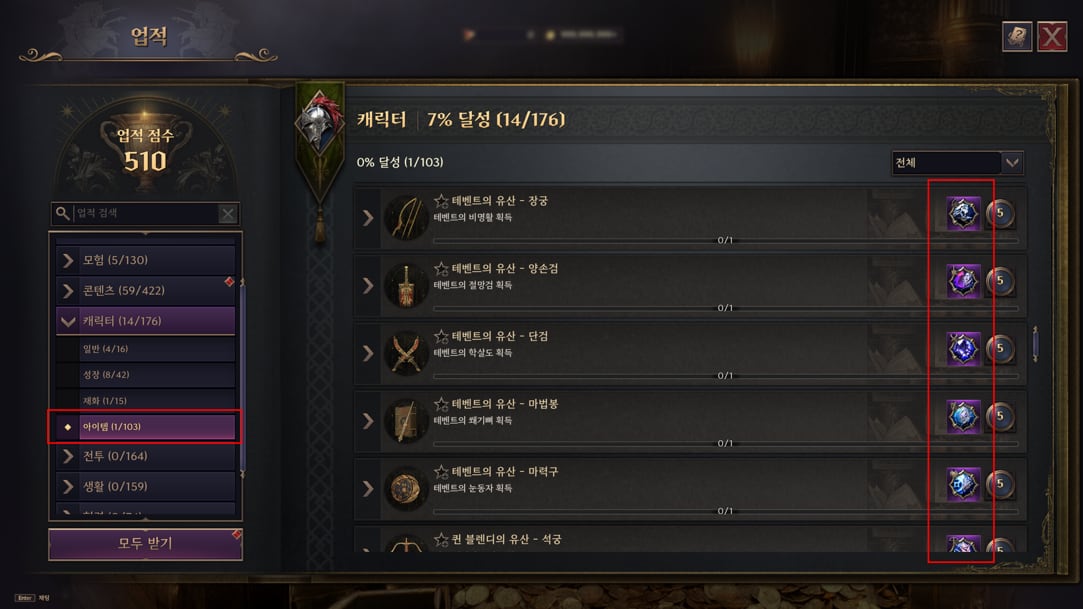
The core economy's bottleneck was always Arch Boss: the weapon and the core used to be separate hunts. From now on, getting the weapon unlocks an obtainment achievement that delivers the matching core.
Arch Boss weapon obtainment achievement
New system
▲ Weapon delivers core
Before
You had to extract and engrave to use the weapon and the core at the same time
After
The achievement delivers the weapon's core, already registered automatically — no extraction or engraving needed
Whoever already has the weapon
Retroactive
▲ Automatic
A character who already owns the Arch Boss weapon has the achievement marked complete and the core registered automatically. The reward counts as already claimed — it can't be collected twice.
Existing Arch Boss cores
Mass conversion
⚙ 60 cores collected
Every Arch Boss core is collected and moved into the registered state, and the matching weapon arrives by mail. Also applies to those who got the weapon through a core substitution. The next five chapters cover the full table.
The item achievements tab with the new Arch Boss lines — each weapon obtained delivers the core alongside it
CHAPTER 11
Conversion: the ten Tevent cores
System
Ten Tevent cores are collected. Each one returns the source weapon by mail, with the obtainment achievement already marked as claimed.
Receives by mail: Deluge Noah's Snowsoul Gauntlet (델루즈 노아의 설혼권갑)
CHAPTER 14
Conversion: the twelve Giant Brook cores
System
Twelve Giant Brook cores, across the three lineages — and this is where the Resurrection Stone sits, the only piece in the table that isn't an attack weapon.
Receives by mail: Giant Brook's Snowsoul Orb (자이언트 브룩의 설혼구)
CHAPTER 15
Conversion: the ten standalone and dragon cores
System
The ten cores that don't belong to any of the four Arch Boss lineages close out the table — including the ones from the Last Dragon and from the Inverted Scale.
Skill Core: Dragon's Counterattack (스킬 코어: 용의 역습)
Standalone cores
⚙ Becomes a weapon
Before
Core collected on conversion
After
Receives by mail: Last Dragon's Thunder Greatsword (마지막 용의 천둥대검)
Skill Core: Wall of Bitter Frost (스킬 코어: 혹한의 성벽)
Standalone cores
⚙ Becomes a weapon
Before
Core collected on conversion
After
Receives by mail: Sword of the Scale Lord's Slaughter (비늘 군주의 학살검)
Skill Core: Atirat's Claw (스킬 코어: 아티라트의 발톱)
Standalone cores
⚙ Becomes a weapon
Before
Core collected on conversion
After
Receives by mail: Last Dragon's Thunderclap Dagger (마지막 용의 뇌명단검)
Resin Flower and expedition participation reward boxes obtained before the update don't roll the new cores. If you've been saving a box for later, open it and restock — the old stock is on a different table.
CHAPTER 18
Where cores drop now — and the flower that crafts whatever you want
PvE
Core supply opened up on two fronts: more drop sources, and a recipe that lets you choose the core, once a month.
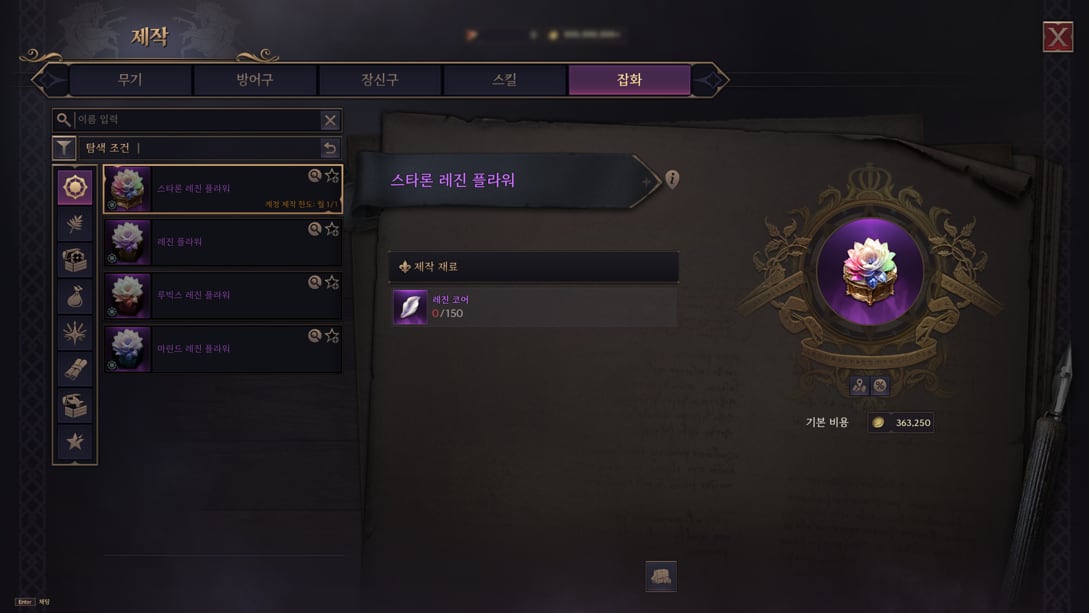
The Staron Resin Flower recipe in the materials tab: 150 Resin Cores and 363,250 Solant, with the monthly cap marked on the card
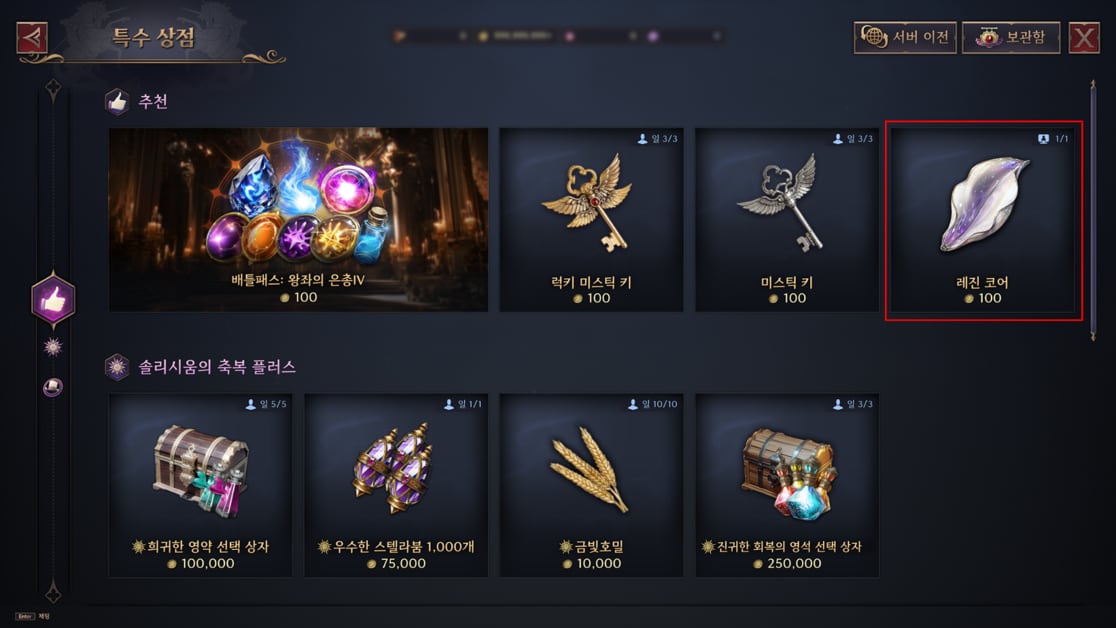
The Resin Core package for 100 Solant in the special shop, limited to one purchase per account
Sources of the new cores
Where the 30 cores appear
▲ Eleven sources
Resin Flower (레진 플라워), Rubix Resin Flower, Marind Resin Flower, and Staron Resin Flower; participation reward from field boss and Arch Boss expeditions; kill reward from field boss and Arch Boss; Rift's Golden Chest, Tumgir Ruins, field PvP rewards, Elite and Hero co-op dungeons, and Tower of Greed.
Core rate on the Resin Flowers
Resin, Rubix, and Marind
▲ Chance increased
The chance of getting a skill core went up on the Resin Flower, Rubix Resin Flower, and Marind Resin Flower.
Tower of Greed
Reward table
▲ New source
Skill core now enters the reward pool of the Tower of Greed.
Staron Resin Flower (스타론 레진 플라워)
New recipe · guaranteed choice
▲ 1 chosen core/month
Craft the core you want, of any tier, with Resin Core (레진 코어). Limit of one craft per account per month. The crafted core is untradeable, but can be dissolved — returning the same amount of Resin Core as always.
Starter kit in the special shop
Material for one craft
▲ 100 Solant
For anyone who hasn't saved up materials, the special shop sells material for one craft for 100 Solant — one purchase per account, for a limited time.
CHAPTER 19
Guild friendly alliance was erased from the game
PvP
No middle ground, no transition period: the guild friendly relationship (길드 우호) stopped existing. Whoever relied on a network of allies to boost output on a Siege Stone lost the whole mechanic.
Guild friendly relationship
System
▼ Removed
Friendly relationship info left the guild interface. Existing relationships and pending requests are wiped.
Set A Siege Stone effect
Resource production
▼ Effect removed
Before
A friendly guild owning a Siege Stone in the set boosted your own resource production
After
Effect erased along with the friendly system
Friendly guild chat and alerts
Communication
▼ Removed
The friendly guild chat channel and friendship notifications were removed.
Stella Vision
Settings
▼ Option removed
The friendly guild setting left the Stella Vision options.
CHAPTER 20
Tower of Greed compressed to five floors per zone
PvE
The Tower of Greed (탐욕의 탑) opens a new season on November 11 with a shortened structure: every zone drops to five floors, and a whole zone is gone.
In place of the stretched-out grind comes Amplification (증강), a temporary buff that only exists inside the tower and that you pick while climbing.
The Tower's Awakening (탑의 태동)
Zone structure
⚙ Kept
Before
Floors 1 through 5
After
Floors 1 through 5
The Tower's Dawn (탑의 여명)
Zone structure
▼ 10 → 5 floors
Before
Floors 1 through 10
After
Floors 1 through 5
The Tower's Gloaming (탑의 어스름)
Zone structure
▼ Zone removed
Before
Floors 1 through 15
After
Removed
The Tower's Dusk (탑의 황혼)
Zone structure
▼ 10 → 5 floors
Before
Floors 1 through 10
After
Floors 1 through 5
The Tower's Abyss (탑의 심연)
Zone structure
▼ 10 → 5 floors
Before
Floors 1 through 10
After
Floors 1 through 5
Orb of Greed (탐욕의 보주)
Engraving
⚙ Rescaled
The engraving stages and the total per stage were changed to match the shortened tower.
Rewards that enter
Loot table
▲ Resin Flower
Resin Flower now drops in the tower. Precious Marind Ore and Weapon Specialist Seal had their quantity increased.
Rewards that leave
Loot table
▼ 6 items cut
Removed from the table: Noble Polishing Crystal, Rare Artifact Selection Box, Greed Accessory Selection Box, Greed Armor Selection Box, Precious Spirit Recovery Stone, and Conversion Stone.
Amplification (증강)
Tower-exclusive buff
▲ New system
Only applies inside the Tower of Greed: it drops when you leave and comes back on re-entry. Accumulated effects are reset on entering floor 1 of The Tower's Awakening.
Ring of Amplification (증강의 고리)
How to obtain it
▲ Per floor
Appears when you clear the first stretch of each floor, except in The Tower's Abyss. A common Amplification can be obtained repeatedly to strengthen the effect — and once you're already at max grade, you can swap the ring's options or skip the choice.
Chaos Amplification Body (혼돈의 증강체)
Special ring option
▲ Weapon amplification
Delivers at random a weapon amplification compatible with your equipped weapon. Doesn't repeat an amplification you already have; once you have every one available, you can swap the options or skip.
External Codex: Tower of Greed
The Beginning of the Search for Truth
⚙ Objectives swapped
Before
Clear floor 2 of The Awakening · Clear floor 4 of The Awakening · Get the bonus reward on floor 5 of The Awakening
After
Clear floor 1 of The Dawn · Clear floor 1 of The Dusk · Get a bonus reward in the Tower of Greed
CHAPTER 21
New seasons and 120 rubbings in Nix's season 2
PvE
Four seasonal contents restart the same day as the tower, and the rubbing album gains an entire volume dedicated to Nix.
Seasons restarting on November 11
Four contents
⚙ New schedule
Challenge Dimension (도전 차원진), Infinite Gateway (무한의 관문), Battlefield (전장), and Corridor of Illusion (환상회랑) start a new schedule on Wednesday, November 11.
Rubbing album (탁본집) — Nix season 2
New content
▲ 120 rubbings
Completing the album delivers trait and resonance material, assorted gems, and Resin Flower.
Season 2 window
Rubbing album
⚙ Until Feb 3, 2027
The album's season 2 stays live until February 3, 2027.
CHAPTER 22
World Tree's Guide pays more and swaps two shopping quests
PvE
The first two stages of World Tree's Guide (세계수의 인도) got a stronger reward, and two quests that only asked for a merchant visit became Codex tasks instead.
The Root's Beginning and The Leaf's Fruit
Stage reward
▲ Reward strengthened
The gear set delivered and the item level were raised in both stages.
The Leaf's Fruit — stage 2, quest 8
Objective swapped
⚙ New quest
Before
Buy any item from the miscellaneous merchant at every outpost
After
Complete in the Adventure Codex, Part 1, Act 8: Appendix ▶ How to cut gear, Appendix ▶ How to open gear traits, and Appendix ▶ How to enhance gear traits
The Leaf's Fruit — stage 2, quest 9
Objective swapped
⚙ New quest
Before
Buy any item from the guild merchant at every outpost
After
Complete in the Adventure Codex, Part 1, Act 9: Appendix ▶ Steps toward power and Appendix ▶ How to inherit gear
Whoever already finished the Guide
Retroactive
▲ Through the free coupon
A character who already completed World Tree's Guide also gets the new gear — just use the free Character Boost coupon.
CHAPTER 23
Activity points recalibrated across eleven fronts
System
Content that didn't give activity points now does, and the scale was rebalanced. The sharpest jump is Corridor of Illusion: from 50 to 180.
Challenge Dimension — cumulative score reward
Activity points
▲ 0 → 40
Before
0
After
40
Co-op dungeon
Activity points
▼ 50 → 45
Before
50
After
45
12-player raid
Activity points
▲ 50 → 70
Before
50
After
70
Corridor of Illusion
Activity points
▲ 50 → 180
Before
50
After
180
Infinite Gateway
Activity points
▲ 0 → 90
Before
0
After
90
Guild commission
Activity points
▲ 1 → 50 per unit
Before
1 point per contribution unit, max 100
After
50 points per contribution unit, max 150 — the cap is still unbreakable
Mystic Globe
Activity points
▲ 10 → 15
Before
10
After
15
Mystic Portal
Activity points
▲ 25 → 30
Before
25
After
30
Tumgir Chest
Activity points
▲ 0 → 80
Before
0
After
80
Nix event
Activity points
▲ 0 → 10
Before
0
After
10
Space-Time Singularity · Relic Fishing
Activity points
▲ 0 → 40
Before
0
After
40
Display of points already granted
Fix
⚙ Fix
Fixed the case where activity points already granted weren't showing up in the interface.
CHAPTER 24
Accuracy stops being a dead attribute
Skill
The balance block in these notes has just one thesis, and NC wrote it out in full in the dev comment.
Dev comment thesis
Accuracy vs. other attributes
▲ Accuracy starts paying off
The team admits that closing a high Accuracy value paid off relatively little compared to other attributes. To compensate, effects proportional to Accuracy were added to a few weapons — namely Longbow and Orb.
"The benefit of closing a high Accuracy value was relatively low compared to other attributes. To compensate for this, we added effects to a few weapons."
Longbow and Orb received effects that convert Accuracy into gains — shield, max damage, party Accuracy, and Weaken hit rate.
CHAPTER 25
Dagger
Skill
Two lines, and the first is the kind that changes a skill's nature: Mark of Death stops calculating damage and starts executing.
Mark of Death (죽음의 낙인) core — [Execution]
Player target at 10% HP or below
▲ Becomes an execution
Before
When Mark of Death deals damage, applies heavy damage to a player target at 10% HP or below → judged as dealing damage to the target
After
When Mark of Death deals damage, executes a player target at 10% HP or below → judged as killing the target
Fixed the case where, without the poison cloud actually being generated, the game would print Miss on screen.
CHAPTER 26
Longbow
Skill
Longbow is the biggest winner of the patch. Three effects now scale with ranged Accuracy, and Hunt's Beginning's party buff stops being just damage.
Barrier of Devotion (헌신의 결계)
Low-HP shield · Hero level 5 reference
▲ Scales with Accuracy
Before
On dropping to 30% HP or below, creates for 3s a shield with 6,500 HP and grants 60 damage reduction. 60s reactivation limit.
After
On dropping to 30% HP or below, creates for 3s a shield with 5,500 HP, +120 shield HP per 100 ranged Accuracy, and grants 60 damage reduction. 60s reactivation limit.
Barrier of Devotion (헌신의 결계) — damage reduction
Fix
⚙ Fix
Fixed the issue where the damage reduction wasn't receiving the reinforcement duration attribute.
Advanced Tactic [Bombardment Stance] (맹폭 자세)
With Rapid Shot Stance active · Hero level 5 reference
▲ +1.5 max damage / 100 Accuracy
Before
With Rapid Shot Stance active, activation time becomes 4s and attack speed increase is amplified by 20%.
After
Same effect, and max damage rises 1.5 per 100 ranged Accuracy.
Just one line, and it's a combat-readability one: the visual effect made it look like the mark had landed when the target had actually blocked.
Mark of Mortality (필멸의 표식)
Visual effect fix
⚙ Fix
Fixed the issue where the debuff animation showed up even when the target successfully blocked with a defensive skill.
CHAPTER 28
Staff
Skill
Staff gets the longest block in the balance section — and the change that most reshapes the rotation is Detonating Thunder Bombardment, which now clears all ignition stacks at once.
Summons 10 lightning spears on the target, each dealing 81% of base damage + 14. With your own ignition applied, each spear deals 18% of the remaining damage over time and reduces ignition by 1 stack.
After
Summons 10 lightning spears on the target, each dealing 81% of base damage + 14. With your own ignition applied, deals 18% of ignition's remaining damage over time immediately and removes all applied ignition stacks.
With specialization 2 applied, the buff's reinforced visual effect now displays.
[Dark Cloud] (암운) core — core description
Text reinforced
⚙ Text fixed
Before
The [Thunder's Blessing] skill from the Inner Peace specialization turns into the [Dark Cloud] skill, applied to the target. The skill cannot be evaded or purified, lightning damage rises 60%, and applies Weaken: Thundercloud. With 2 of 3 among Dark Cloud, Lightning Condensation, and Thundercloud Explosion active, only the highest amplification counts.
After
The [Thunder's Blessing] skill from the Inner Peace specialization turns into the [Dark Cloud] skill, applied to the target. The Dark Cloud state cannot be evaded or purified, lightning damage rises 60%, and applies Weaken: Thundercloud. With 2 of 3 among Dark Cloud, Lightning Condensation, and Thundercloud Explosion active, only the highest amplification counts.
[Dark Cloud] (암운) core — effect description
Hero level 5 reference
⚙ Text fixed
Before
The [Thunder's Blessing] skill from specialization 1 Inner Peace turns into the [Dark Cloud] skill, which hovers over the target and cannot be evaded or purified. Deals 120% of base damage per trigger to a random enemy in the area for 6s and applies Weaken: Thundercloud. For 6s mana regeneration rises 960%; if you're Wet, the gain doubles; if not, after the skill ends, mana consumption efficiency rises 96% for 6s.
After
The [Thunder's Blessing] skill from specialization 1 Inner Peace turns into the [Dark Cloud] skill and applies the Dark Cloud state to the target, which cannot be evaded or purified. Deals 120% of base damage per trigger to a random enemy in the area for 6s and applies Weaken: Thundercloud. For 6s mana regeneration rises 960%; if you're Wet, the gain doubles; if not, after the skill ends, mana consumption efficiency rises 96% for 6s.
The damage amplification per stack of Weaken: Thundercloud was being applied below the configured value
After
Issue fixed and the value set to 20% per stack
CHAPTER 29
Wand
Skill
One line, but it's the kind a support feels in a raid: the extended duration of your own buff finally reaches the party.
Barrier of Grace (은총의 결계)
Caster's reinforcement duration
⚙ Fix
Fixed the issue where the duration calculated with the caster's reinforcement duration attributewasn't being applied to party members.
CHAPTER 30
Orb
Skill
Orb is the second weapon to start reading Accuracy. Resonant Rift converts magic Accuracy into Weaken hit rate, and Amplification Cloak trades 2% of fixed damage for scaling.
Resonant Rift (공진 균열)
Hero level 5 reference
▲ +8 Weaken hit rate / 100 Accuracy
Before
Dealing damage 3 times to the same target within 1s with an orb or satellite effect applies Weaken: Rift. Landing a critical hit on a Rifted target with a use skill cracks the rift and deals 121% of base damage + 70.
After
With Resonant Rift active, Weaken hit rate rises 8 per 100 magic Accuracy. Dealing damage 3 times to the same target within 1s with an orb or satellite effect applies Weaken: Rift. Landing a critical hit on a Rifted target with a use skill cracks the rift and deals 121% of base damage + 70.
Cloak of Distortion, specialization 1 [Amplification Cloak] (증폭 장막)
Hero level 5 reference
▲ Scales with magic Accuracy
Before
Creates a shield on yourself with 530% of base damage + 1,812 HP for 6s. While the shield lasts, base damage is amplified by 15%. If the shield is fully consumed, you get 15s unable to reuse it and base damage drops 15%.
After
Creates a shield on yourself with 530% of base damage + 1,812 HP for 6s. While the shield lasts, base damage is amplified by 13%, +1.2% shield HP and +0.2% additional amplification per 100 magic Accuracy. If the shield is fully consumed, you get 15s unable to reuse it and base damage drops 15%.
CHAPTER 31
Items: Last Dragon's Thunder Greatsword doubles its counterattack
Buff
Five unique weapons made the list. One gets a real buff; the other four lose interactions that shouldn't have existed.
Last Dragon's Thunder Greatsword (마지막 용의 천둥대검) — [Dragon's Counterattack]
Counter damage
▲ 75% → 160%
Before
Landing Valorous Strike or Cutting Wave, 80% chance to apply Taunt for 4s; when hit by a taunted target within 15m, 70% chance to counter with 75% of base damage. Valorous Strike, Brutal Strike, and Cutting Wave amplify 35% and gain +3s cooldown.
After
Landing Valorous Strike or Cutting Wave, 80% chance to apply Taunt for 4s; when hit by a taunted target within 15m, 70% chance to counter with 160% of base damage — up to 5 counters per second. Valorous Strike, Brutal Strike, and Cutting Wave amplify 35% and gain +3s cooldown.
Fixed the issue where the effect wasn't triggering when a Longbow skill detonated 25 Barrage stacks.
Last Dragon's Thunderclap Dagger (마지막 용의 뇌명단검) — [Atirat's Claw]
Tax Transport
⚙ Fix
Fixed the issue where damage proportional to a player target's max HP dealt extremely high damage against targets turned into Titan Cargo in the Tax Transport content.
Cold-Blooded Commander's Tracker Crossbow (냉혈의 지휘자 추적쇠뇌) — [Blessing Theft]
Fix
⚙ Fix
Fixed the issue where the effect couldn't remove Longbow's Healing Touch specialization 4 [Concentration Stance].
Wand of Justice's Dedication (정의의 헌사 마법봉) — [Barrier of Salvation]
Fix
⚙ Fix
Fixed the fact that the weapon's effect was also affecting the Corrupted Magic Circle (부패 마력진).
CHAPTER 32
Unified matchmaking: three queues at once
System
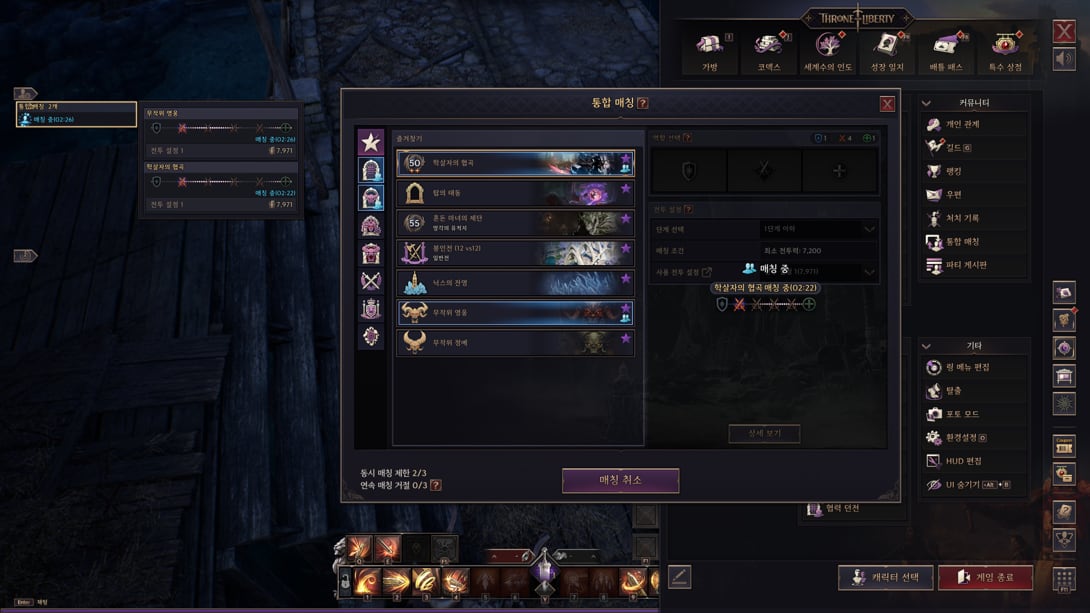
Party Search became Unified Search: everything that has a queue shows up on a single screen, and you can be in up to three queues at the same time.
The detail that actually changes your routine is different: you choose the combat loadout when you queue up, and it's applied automatically when the match starts.
Unified Search in action — the footer marks "2/3" simultaneous queues and "0/3" consecutive declines
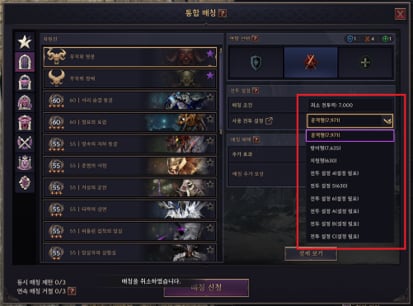
Content with role choice: the loadout selector appears above the minimum combat power
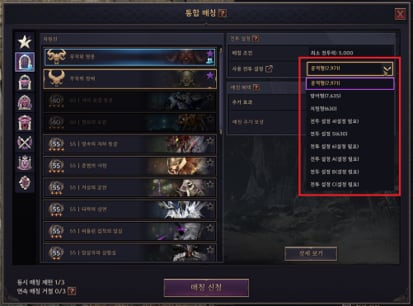
Content without role choice: only the combat loadout defines the sign-up
Party Search → Unified Search
Scope
▲ Everything on one screen
Before
Scattered queues, with Battlefield and Rift outside party search
After
Battlefield and Rift show up together — and every queued content created from now on joins Unified Search
Simultaneous queues
Limit
▲ Up to 3
Content with an active queue shows up in the HUD's member management; hovering over it, a tooltip shows progress.
Match found
Accept and decline
⚙ First to close wins
Every match found can be accepted or declined. You enter the content whose entire party accepts first.
Combat loadout at sign-up
Mandatory
⚙ New step
Besides role, you must also pick the combat loadout that will be used after entering. Role and minimum combat power are now evaluated by that loadout — and it's applied automatically on entry.
Decline penalty
Manual decline
▼ 3 in a row
Before
Counter designed for one queue at a time
After
Every decline during the accept step adds to the consecutive decline counter; hitting 3 in a row applies the penalty. The counter resets when you play content entered via queue.
Timeout penalty
Automatic decline
▼ Immediate penalty
Letting the accept timer run out counts as an automatic decline — and in that case the penalty applies right away, no need for three.
Combat loadout 1 with zero combat power
Convenience
▲ Fills itself in
If combat loadout 1 has 0 combat power, the current loadout is automatically copied into it.
Character name in queue progress
Privacy
⚙ Removed
Hovering over queue progress no longer shows the character's name.
CHAPTER 33
Boss Gate becomes a guild call-to-arms
System
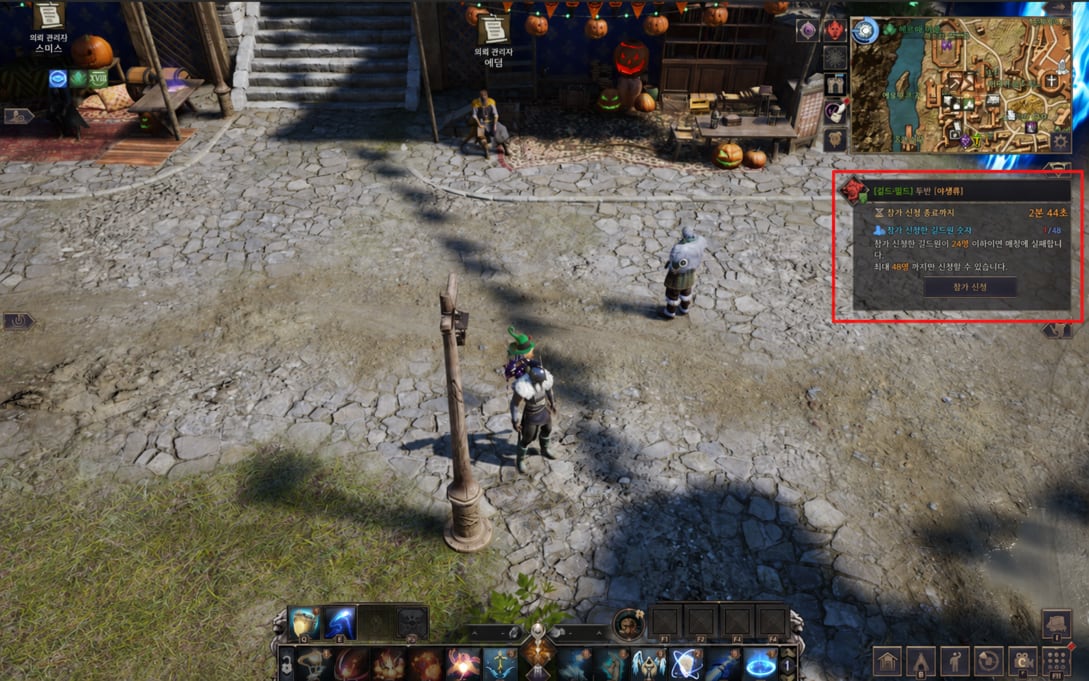
Signing the guild up for Boss Gate stops being a job of coordinating people one by one in chat. One officer signs up, and the alert drops into everyone's notifications.
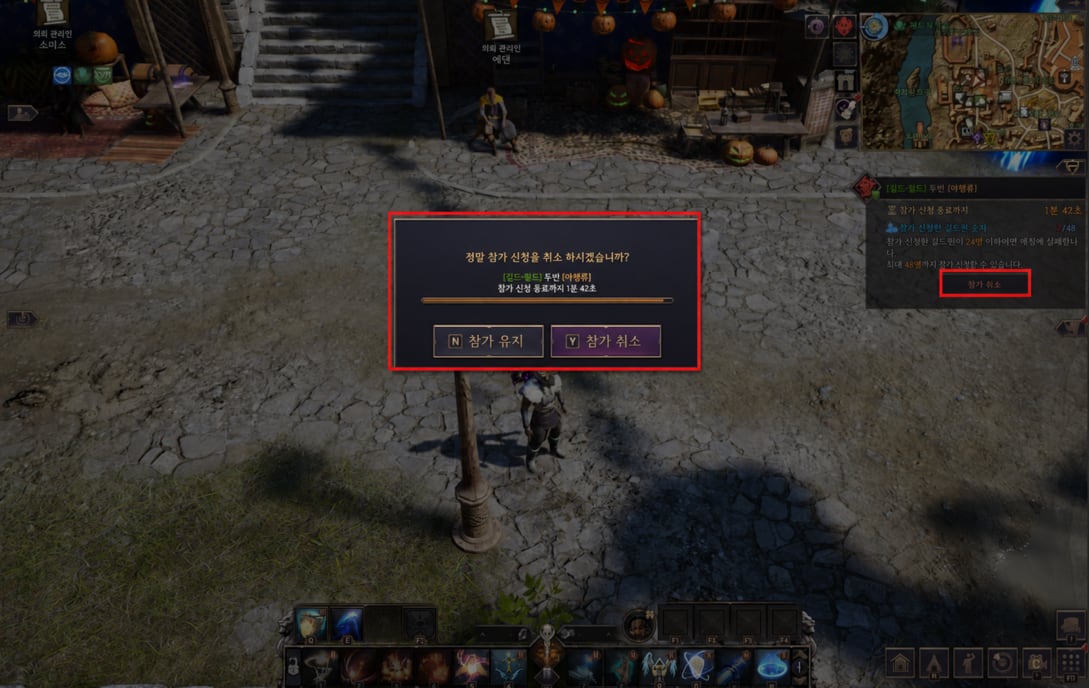
The call-to-arms shows up on the HUD alert with the countdown and the guild's sign-up count
The same button cancels participation, with confirmation before the deadline
Boss Gate sign-up — guild type
Flow
▲ Collective call-to-arms
Before
Individual sign-up, every member on their own
After
A permitted member signs up and every guild member gets the notification
Who can call it
Permissions
⚙ Three ranks
Guild leader, chief officer, and guard — just one of them needs to sign up for the alert to reach the whole guild.
Sign up and cancel
Interface
▲ Straight from the alert
The sign-up button in the alert works for both joining and cancelling.
CHAPTER 34
Fixed-to-screen interaction and locked crafting material
System
Two small conveniences that fix daily annoyances: the interaction box can stop dancing around with the camera, and crafting now warns you the material is locked before you try and fail.
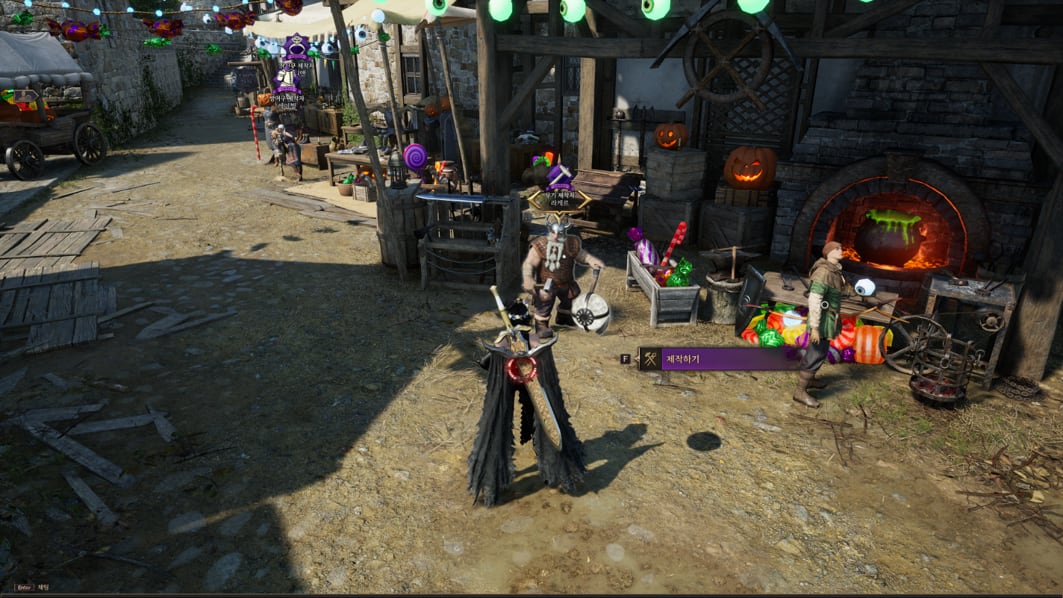
The interaction box anchored to the screen, instead of floating along with the object
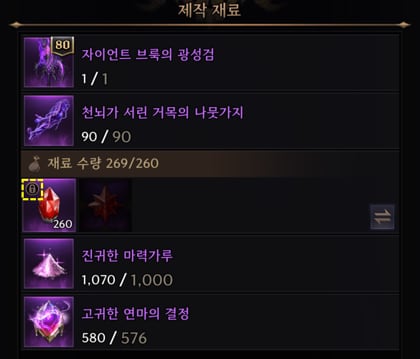
The yellow lock on the material icon tells you why crafting isn't moving forward
Interaction target display mode
Options – Gameplay – UI
▲ "Screen" mode
Choosing Screen in Options – Gameplay – UI – Interaction target display mode keeps the interaction interface fixed to the screen, and its position is adjustable. Co-op interactions still draw over the target, regardless of mode.
Locked material in crafting
Crafting
▲ Icon marker
Material with an active lock now shows a marker on the icon. With a locked material in the mix, crafting doesn't go through — unlock it before trying.
Emoticons and emotes
Shortcuts
▲ Go into quickslots
Emoticons and emotion expressions can now be registered to quickslots.
CHAPTER 35
Voice chat enters the client — and console is left out
System
Voice chat now belongs to the game, not the launcher. It's built on channels — party, guild, and faction war team — and there's no more distance-based voice or automatic transcription.
None of this applies on PlayStation 5 and Xbox Series X/S, which go without voice for now.
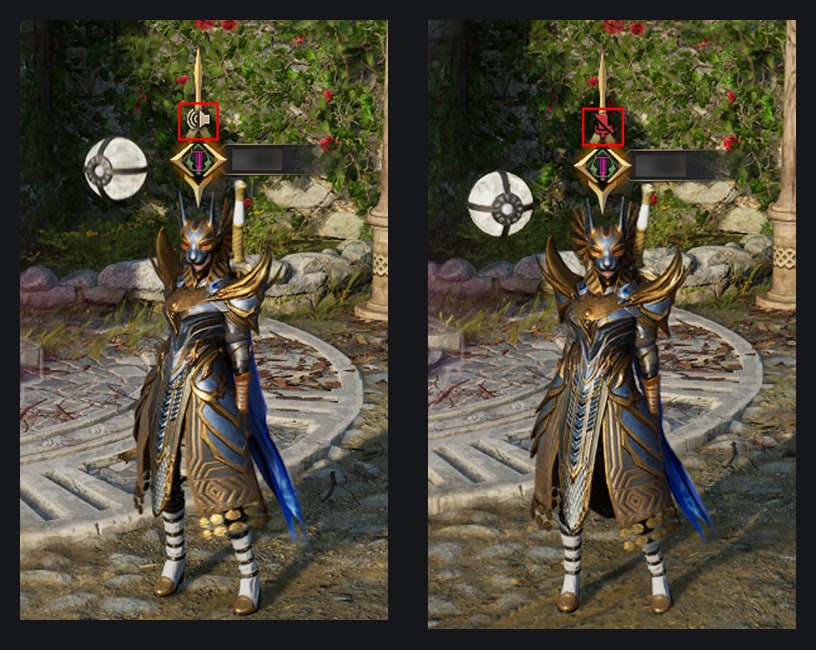
The chat menu icons, in official order: inactive and active channel; then party, guild, team channel, and muted mic
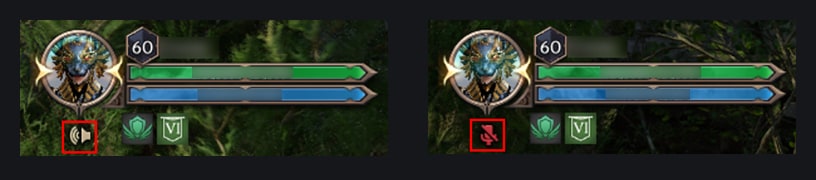
On the HUD: speaking into the mic on the left, disconnected mic on the right
Turning voice chat on
Options – Voice chat
▲ Inside the game
Turn it on in Options – Voice chat – Enable voice chat. Running through the PURPLE launcher, the connection stops going through PurpleTalk and becomes the game's own voice chat.
Steam
Behavior change
▼ No more distance-based voice
Before
Steam voice chat with distance-based voice
After
Method changed and distance-based voice is no longer offered
Available channels
Structure
⚙ 3 channels
Party, guild, and team (faction war). A standalone party voice chat isn't offered.
Voice-to-text conversion
Old function
▼ Removed
The function that transcribes speech into text and its related options were removed.
Joining and leaving
Chat menu
⚙ No auto-join
Pick the channel in Chat menu → Voice chat. Joining party, guild, or faction war doesn't connect you automatically — the channel becomes available, but joining is manual. You can only be in one channel at a time, and you leave through End voice chat.
Status indicators
HUD and nameplate
▲ New icons
The chat menu icon shows whether voice is active, mic status, and the channel in use. While taking part in the conversation, mic status also shows up in the HUD and on the nameplate — your own nameplate may not display it, depending on nameplate settings.
Voice input method
Options – Sound – Voice chat
▲ 3 modes
Always on (sends everything the mic picks up, no key), Toggle (turns on and off with each key press), and Hold (sends while the key is held). The same place has mic sensitivity and voice volume.
Voice key
Options – Shortcuts – Character
⚙ Mandatory setup
Picking Toggle or Hold, it's mandatory to set the shortcut in Options – Shortcuts – Character for voice to work.
PlayStation 5 and Xbox Series X/S
Console
▼ No voice for now
The game's voice chat isn't supported for now on consoles. The menu, options, and voice help stop being shown, and the voice item leaves the ring menu.
Console ring menu
Page 1, 4th item
⚙ Item swapped
Before
Voice chat
After
Check party readiness
On the nameplate: the same pair of states — speaking and mic disconnected
CHAPTER 36
Content fixes: Nix, Plains of Chaos, and Cradle of the Iron Cat
Fix
Four content fronts made the list. The most relevant for Nix farmers is the Iceeye Sentinel's, which used to stop being fightable whenever it decided to walk off.
Iceeye Sentinel (얼음눈 파수꾼) — Nix
Elite monster
⚙ New behavior
Before
Used its movement skill with high frequency and left the combat spot
After
Frequency reduced; and if it moves too far from where combat started, it uses the movement skill to return to the starting spot
Navigator Sorel (항해사 소렐) — Nix's Reflection
Plains of Chaos
⚙ Attack reclassified
Before
Attack that applied stun
After
Becomes a wrath attack
Arsenal Executioner (무기고 망나니) and Powder Store Rogue (화약고 난봉꾼)
Plains of Chaos
▼ Knockdown removed
The chance-based knockdown effect on the charge attack was removed.
Nix's Reflection (닉스의 잔영)
Fix
⚙ Fix
Fixed the case where, on dying outside the region's boundaries, the status panel would intermittently disappear.
Dimension: Cradle of the Iron Cat (차원진 : 철묘의 요람)
Felinex
⚙ Fix
Fixed the case where, after Felinex used a certain skill against a player suspended in the air, that player's attacks would temporarily stop registering.
CHAPTER 37
Guild, items, marketplace, and anonymity
Fix
The most important block here is the marketplace one: the minimum level to trade jumped from 40 to the level cap. Anyone relying on an alt to run the marketplace needs to rethink.
Level required to use the marketplace
Auction house
▼ 40 → level cap
Before
Level 40 reached
After
Level cap reached
Rune boxes
Stacking
▲ Stack of 1,000
Before
Limited stack
After
Max stack of 1,000 — boxes you already own are re-sent by mail to apply the new limit
Unique Trait Enhancement Stone and Dimensional Essence
Storage
▲ Can go into the warehouse
Before
Couldn't be stored in the warehouse
After
Now storable in the warehouse
Guild: editing the guild notice now shows the character count typed and the max allowed in the window.
Guild: fixed the case where, in sale to guild members via the item chest, the price in Lucent was intermittently recorded as 0 instead of the set value.
Item: fixed the issue where Erosion Elixir (침식의 영약) didn't remove the Rigidity state caused by Vegarion and Vegarus during the Vegamont content.
Anonymized content: choosing Gameplay > Character > Name Display > Mark > Weapon in options now shows the equipped weapon where the nameplate's emblem would go.
Anonymized content: faction war team colors become yellow, purple, and green.
Anonymized content: a disguised anonymous target no longer shows the emblem on the target interface or nameplate.
Anonymized content: the kill message now shows the team emblem of the player involved.
Anonymized content: every Stella Vision option is now shown, regardless of whether you're taking part in the content.
CHAPTER 38
HUD, dialogue, gamepad, and amitoi
Fix
The rest of the fixes are interface-level — and one of them changes a habit: pressing ESC on a dialogue's last line now cancels the conversation instead of completing it.
ESC on the dialogue's last line
Conversation interaction
⚙ Behavior changed
Before
The conversation was completed
After
The conversation is cancelled — and therefore doesn't count as completed
Apply photo function
Customization
▼ Removed
The apply photo function in customization was removed.
HUD editing: fixed the case where, editing the HUD with a gamepad, the "searching for match" notice would show up where the party interface sits.
HUD editing: the party interface's edit area now shows the item names match title and match status.
HUD editing: the party interface's edit area now matches the actual area where members are shown.
Gamepad: fixed the issue where it wasn't possible to operate the popup when trying to exit the game inside the customization space.
Party: fixed the interface misalignment when displaying the party type.
Amitoi and wild transformation: lists are now sorted by type.
Amitoi expedition: fixed the case where, switching regions after defeating the expedition's boss, the number of registered amitoi wasn't reflected correctly.
CHAPTER 39
Events: 35 days of login rewards and two long campaigns
Event
The login calendar Nix, the Uniting Frontier opens with the maintenance and runs through December 15 — but there are 35 days of rewards to claim inside that window.
The big prize sits at the end: day 28 delivers a Toland Arcane Weapon Selection Box, and the following seven days deliver material to level it up.
Nix, the Uniting Frontier — login calendar
Event window
▲ 35 days
Login and reward claim from November 11, 2026, at 11:00, through December 15, 2026.
Calendar milestone prizes
Days 1, 18, 25, and 28
▲ Four selection boxes
Day 1: Kalancia Weapon Selection Box. Day 18: Kalancia Armor Selection Box. Day 25: Kalancia Accessory Selection Box. Day 28: Toland Arcane Weapon Selection Box.
Open! Mystic Portal of Fortune!
Parallel event
▲ 4 weeks
Four-week campaign built around the Mystic Portal.
Welcome Company
Long-running event
▲ Through Feb 2027
From November 11, 2026 through February 2027.
Day 1 — Kalancia Weapon Selection Box × 1
Day 2 — Unique Trait Opening Stone × 10
Day 3 — Trait Opening Stone × 80
Day 4 — Unique Trait Opening Stone × 10
Day 5 — Trait Resonance Stone × 160
Day 6 — Trait Opening Stone × 100
Day 7 — Trait Enhancement Stone × 130
Day 8 — Unique Trait Opening Stone × 10
Day 9 — Trait Opening Stone × 100
Day 10 — Unique Trait Opening Stone × 10
Day 11 — Attribute Conversion Scroll × 3
Day 12 — Trait Resonance Stone × 170
Day 13 — Trait Opening Stone × 100
Day 14 — Trait Enhancement Stone × 150
Day 15 — Unique Trait Opening Stone × 10
Day 16 — Trait Opening Stone × 100
Day 17 — Trait Opening Stone × 100
Day 18 — Kalancia Armor Selection Box × 1
Day 19 — Unique Trait Opening Stone × 10
Day 20 — Trait Opening Stone × 100
Day 21 — Trait Enhancement Stone × 150
Day 22 — Unique Trait Enhancement Stone × 58
Day 23 — Unique Trait Opening Stone × 10
Day 24 — Trait Opening Stone × 100
Day 25 — Kalancia Accessory Selection Box × 1
Day 26 — Unique Trait Opening Stone × 10
Day 27 — Trait Opening Stone × 150
Day 28 — Toland Arcane Weapon Selection Box × 1
Day 29 — Toland Arcane Weapon Material Selection Bag × 5
Day 30 — Toland Arcane Weapon Material Selection Bag × 5
Day 31 — Toland Arcane Weapon Material Selection Bag × 5
Day 32 — Toland Arcane Weapon Material Selection Bag × 5
Day 33 — Toland Arcane Weapon Material Selection Bag × 5
Day 34 — Toland Arcane Weapon Material Selection Bag × 5
Day 35 — Toland Arcane Weapon Material Selection Bag × 5
CHAPTER 40
Promotions: Battle Pass IV and consumables
Event
Two sales windows open with the maintenance. The pass one is short — two weeks.
Battle Pass: Throne's Grace IV (배틀패스: 왕좌의 은총IV)
Nov 11–25, 2026
⚙ 100 Solant
Limit of one purchase per character. Content is activated per character and not shared with the rest of the account. A pass bought with Lucent is used on purchase in the special shop — activation is immediate.
Mystic Key
Nov 11 – Dec 9, 2026
⚙ 100 Solant
Limit of 3 per day, per character.
Lucky Mystic Key
Nov 11 – Dec 9, 2026
⚙ 100 Solant
Limit of 3 per day, per character.
Resin Core × 150
Nov 11 – Dec 9, 2026
⚙ 100 Solant
Limit of one purchase per account — this is the bundle that bankrolls your first Staron Resin Flower.
CHAPTER 41
Known issues
Fix
NC published two issues alongside the notes — both with a stated workaround or fix timeline.
Combat power of combat loadouts
Known issue
⚠ Manual workaround
Some saved combat loadouts had their combat power miscalculated and reset to zero. Simply apply the affected loadout to save the correct value again.
Skill core on another player's weapon
Known issue
⚠ Fix planned
It's not possible to check the core equipped on another character's Unique weapon. NC will remove the core information from the Unique weapon's tooltip and create a core section in the equipped item info window.
Opinion
Scaryel's take
Analysis
S
Scaryel comments
⟡ Creator's voice
“There are two notes inside this one, and the second is the one that matters. The first is bureaucratic: unified clock, cross-region transfer, six characters — service-merger busywork, inevitable and dull. The second is NC quietly admitting the skill core system was broken by design. Engraving onto an item with a cost coming and going isn't depth, it's a toll: you picked a core and stayed married to it because swapping hurt your wallet. Now the core lives on the character, swapping is free, there's a set preset system, and thirty new armor and accessory cores show up on top. TL builds just gained two decimal places of freedom. The detail almost nobody will read to the end is Character Boost on an existing character — and that's the patch's most aggressive move: NC is handing out a free coupon per account that puts any level 2–59 character at 60 with 9,000 combat power, 86.5 million Solant, and a 28-day subscription. That's not convenience, it's recruitment. Whoever comes back now arrives ready for the content where the guild actually needs bodies. Just don't apply it to the wrong character: the Boost resets your presets and dumps your entire bag into the warehouse, overflow and all.”
Final verdict⟡ Refoundation patch · the core became a slot and the Boost became an invitationConfidence: 9/10
Impact
Impact on players
Community
What changes in practice
Korean server notes, applied in the Wednesday, November 11 maintenance. The official text was corrected on November 9 at 16:13, in the server transfer section — check the final version before planning a server move. Transfer stays suspended for a few days after the update.
For guilds
Redo the calendar: maintenance and reset are now every Wednesday (05:30 and 06:00 UTC), and the guild friendly alliance stopped existing — including Set A's Siege Stone production bonus.
For solo PvP
Longbow and Orb now convert Accuracy into shield, damage, and Weaken hit rate, and Dagger's Mark of Death now executes targets below 10% instead of just hurting them.
For casual players
Grab the free Character Boost coupon in the lobby: level 60, ~9,000 combat power, 86.5 million Solant, and 28 days of Solisium's Blessing, no new character required.
Summary
1-minute summary
System
⟡ For those in a hurry
01:00
Unified service: maintenance every Wednesday at 05:30 UTC, reset at 06:00 UTC; cross-region transfer with a 30-day cooldown; six characters per account on the former NC service.
Temporary name: nine areas locked (chat, mail, guild, housing, arena, simulated Battlefield, and more) until you use the rename coupon that arrives by mail.
Character Boost: works on a level 2–59 character that hasn't passed the conversation with Beni — level 60, ~9,000 combat power, 86.5 million Solant, runes, PvP kit, and a 28-day subscription.
Watch out with the Boost: presets reset, preset 1 overwritten, bag and gear dumped entirely into the warehouse even past the limit.
Skill core: leaves gear and becomes a slot registered to the character, with free swapping, saved sets, and engraving/extraction removed from the Recombinator.
60 Arch Boss cores: all collected and returned as the source weapon by mail; the engraving scroll becomes 1,220,000 Solant, the extraction scroll becomes a material bundle.
30 new cores: three armor and accessory cores for each of the ten weapons, with Staron Resin Flower crafting 1 chosen core per month.
Tower of Greed: five floors per zone, The Gloaming removed, and the tower-exclusive Amplification system.
Activity points: Corridor of Illusion 50 → 180, Infinite Gateway 0 → 90, Tumgir Chest 0 → 80, guild commission 1 → 50 per unit.
Balance: Longbow and Orb start scaling with Accuracy; Dagger gets an execution below 10%; Last Dragon's Thunder Greatsword goes from 75% to 160% counter damage.
Convenience: three simultaneous queues in Unified Search, Boss Gate calling the whole guild, and voice chat by channel on PC (console left out).
Verdict: refoundation patch, 9/10 — the core became a slot, and the free Boost coupon is an invitation back.